My Haas Welcome,
!
Haas Tooling MyHaas/HaasConnect Sign In Register Haas Tooling MyHaas/HaasConnect Sign Out Welcome, My Machines Latest Activity My Quotes My Account My Users Sign Out
Find Your Distributor
  1. Select Language
    1. English
    2. Deutsch
    3. Español - España
    4. Español - México
    5. Français
    6. Italiano
    7. Português
    8. Český
    9. Dansk
    10. Nederlands
    11. Magyar
    12. Polski
    13. Svenska
    14. Türkçe
    15. 中文
    16. Suomi
    17. Norsk
    18. الإنجليزية
    19. български
    20. Hrvatski
    21. Ελληνικά
    22. Română
    23. Slovenský
    24. Slovenščina
    25. 한국어
    26. 日本語
    27. Українська
  • machines Main Menu
    • Vertical Mills
      Vertical Mills
      Vertical Mills View All
      • Vertical Mills
      • VF Series
      • Universal Machines
      • VR Series
      • VP-5 Prismatic
      • Pallet-Changing VMCs
      • Mini Mills
      • Mold Machines
      • High-Speed Drill Centers
      • Drill/Tap/ Mill Series
      • Toolroom Mills
      • Compact Mills
      • Gantry Series
      • SR Sheet Routers
      • Extra-Large VMC
      • Double-Column Mills
      • Pocket Mill
    • Multi-Axis Solutions
      Multi-Axis Solutions
      Multi-Axis Solutions View All
      • Multi-Axis Solutions
      • Y-Axis Lathes
      • 5-Axis Mills
    • Lathes
      Lathes
      Lathes View All
      • Lathes
      • ST Series
      • Dual-Spindle
      • Box Way Series
      • Toolroom Lathes
      • Chucker Lathe
      • Haas Bar Feeder V2
      • Haas Bar Feeder 12
    • Horizontal Mills
      Horizontal Mills
      Horizontal Mills View All
      • Horizontal Mills
      • 50-Taper
      • 40-Taper
    • Rotaries & Indexers
      Rotaries & Indexers
      Rotaries & Indexers View All
      • Rotaries & Indexers
      • Rotary Tables
      • Indexers
      • 5-Axis Rotaries
      • Extra-Large Rotaries
    • Special Series
      Special Series
      Special Series View All
      • Special Series
      • EU_Series_Redirect
    • Automation Systems
      Automation Systems
      Automation Systems View All
      • Automation Systems
      • Mill Automation
      • Lathe Automation
      • Automatic Parts Loaders
      • Automation Models
    • Desktop Machines
      Desktop Machines
      Desktop Machines View All
      • Desktop Machines
      • Desktop Mill
      • Desktop Lathe
      • Control Simulator, Standard
      • Control Simulator, Premium
    • Shop Equipment
      Shop Equipment
      Shop Equipment View All
      • Shop Equipment
      • Bandsaw
      • Vertical Saw
      • Miter Saw
      • Knee Mill
      • Manual Lathe
      • Laser Cutting Machines
    • Pocket Machines
      Pocket Machines
      Pocket Machines View All
      • Pocket Machines
      • Pocket Mill
    • QUICK LINKS Special Series  Special Series 
      EU SERIES EU SERIES BUILD & PRICE | PRICE LIST BUILD & PRICE | PRICE LIST In-Stock Machines In-Stock Machines WHAT’S NEW WHAT’S NEW YOUR FIRST CNC YOUR FIRST CNC
      SHOPPING TOOLS
      • Build & Price a Haas
      • Price List
      • Available Inventory
      • CNCA Financing
      WANT TO TALK TO SOMEONE?

      A Haas Factory Outlet (HFO) can answer your questions, and walk you through your best options.

      CONTACT YOUR DISTRIBUTOR >
  • Options Main Menu
    • The Haas Control Value Option Packages
      Value Option Packages
      Value Option Packages View All
      • Value Option Packages
    • Product Image Spindles
      Spindles
      Spindles View All
      • Spindles
    • Product Image Tool Changers
      Tool Changers
      Tool Changers View All
      • Tool Changers
    • Product Image 4th- | 5th-Axis
      4th- | 5th-Axis
      4th- | 5th-Axis View All
      • 4th- | 5th-Axis
    • Product Image Turrets & Live Tooling
      Turrets & Live Tooling
      Turrets & Live Tooling View All
      • Turrets & Live Tooling
    • Product Image Probing
      Probing
      Probing View All
      • Probing
    • Haas Chip & Coolant Management Chip & Coolant Management
      Chip & Coolant Management
      Chip & Coolant Management View All
      • Chip & Coolant Management
    • The Haas Control The Haas Control
      The Haas Control
      The Haas Control View All
      • The Haas Control
    • Product Image Product Options
      Product Options
      Product Options View All
      • Product Options
    • Product Image Tooling & Fixturing
      Tooling & Fixturing
      Tooling & Fixturing View All
      • Tooling & Fixturing
    • Product Image Workholding
      Workholding
      Workholding View All
      • Workholding
    • Product Image 5-Axis Solutions
      5-Axis Solutions
      5-Axis Solutions View All
      • 5-Axis Solutions
      • 5 Easy Steps to 5-Axis
    • QUICK LINKS Special Series  Special Series 
      EU SERIES EU SERIES BUILD & PRICE | PRICE LIST BUILD & PRICE | PRICE LIST In-Stock Machines In-Stock Machines WHAT’S NEW WHAT’S NEW YOUR FIRST CNC YOUR FIRST CNC
      SHOPPING TOOLS
      • Build & Price a Haas
      • Price List
      • Available Inventory
      • CNCA Financing
      WANT TO TALK TO SOMEONE?

      A Haas Factory Outlet (HFO) can answer your questions, and walk you through your best options.

      CONTACT YOUR DISTRIBUTOR >
  • Why Haas Main Menu
      Discover the Haas Difference
    • Why Haas
    • MyHaas
    • Education Community
    • Industry 4.0
    • Haas Certification
    • Customer Testimonials
  • Service Main Menu
      Welcome to Haas Service
      SERVICE HOME Operator’s Manuals How-To Procedures Troubleshooting Guides Preventive Maintenance Haas Parts Haas Tooling Videos
  • Videos Main Menu
  • Main Menu
    • View All
    • View All
    • View All
    • View All
      • HTEC Curriculum Support
    • View All
      • Haas 10 kg Cobot Package
      • Cobot Kits
      • DC-1 Drill Center
      • CNC Sales News
    • View All
    • View All
      • contact-us-test
      • 4 - AUTOMATION SYSTEMS
      • Carousel-V2
      • expert test
      • Demo_Day_Trident-test
      • Link Test
      • image-sale-tag-test
    • View All
      • Choose Options
    • View All
    • View All
    • View All
    • View All
    • View All
      • calc-test
    • View All
    • QUICK LINKS Special Series  Special Series 
      EU SERIES EU SERIES BUILD & PRICE | PRICE LIST BUILD & PRICE | PRICE LIST In-Stock Machines In-Stock Machines WHAT’S NEW WHAT’S NEW YOUR FIRST CNC YOUR FIRST CNC
      SHOPPING TOOLS
      • Build & Price a Haas
      • Price List
      • Available Inventory
      • CNCA Financing
      WANT TO TALK TO SOMEONE?

      A Haas Factory Outlet (HFO) can answer your questions, and walk you through your best options.

      CONTACT YOUR DISTRIBUTOR >
  • Haas Tooling Main Menu
  • Haas Service Parts Main Menu
My Haas Welcome,
!
Haas Tooling MyHaas/HaasConnect Sign In Register Haas Tooling MyHaas/HaasConnect Sign Out Welcome, My Machines Latest Activity My Quotes My Account My Users Sign Out
Find Your Distributor
  1. Select Language
    1. English
    2. Deutsch
    3. Español - España
    4. Español - México
    5. Français
    6. Italiano
    7. Português
    8. Český
    9. Dansk
    10. Nederlands
    11. Magyar
    12. Polski
    13. Svenska
    14. Türkçe
    15. 中文
    16. Suomi
    17. Norsk
    18. الإنجليزية
    19. български
    20. Hrvatski
    21. Ελληνικά
    22. Română
    23. Slovenský
    24. Slovenščina
    25. 한국어
    26. 日本語
    27. Українська
×

Search Results

Web Pages

Images

    • <
    • 1
    • >

12 - Haas Cobot - Maintenance

Haas Cobot Package - Operator's/Service Manual


  • 0 - Haas Cobot - Table of Contents
  • 1 - Haas Cobot - Introduction
  • 2 - Haas Cobot - Legal Information
  • 3 - Haas Cobot - Safety
  • 4 - HC5 - Installation
  • 5 - HC10 - Installation
  • 6 - HC15 - Installation
  • 7 - HC30 - Installation
  • 7 - Haas Cobot - Fence/Interlock Installation
  • 8 - Haas Cobot - Area Scanner Installation
  • 9 - Haas Cobot - Light Curtain Installation
  • 11 - Haas Cobot - Operation
  • 12 - Haas Cobot - Maintenance
  • 13 - Haas Cobot - Troubleshooting

Go To :

  • 12.1 Cobot Maintenance Schedule
  • 12.2 Spare Parts List
  • 12.3 Cobot Software Update
  • 12.4 Reset Cobot Zero Position

12.1 Cobot Maintenance Schedule

Maintenance

Keep your Haas Cobot running at peak performance while avoiding unplanned downtime. A maintenance program allows you to manage your schedule rather than getting caught with untimely surprises. This page shows the recommended maintenance intervals.

Maintenance Item Interval
Visual Inspection Daily
Clean Cobot Monthly
Inspect Cables and Tubing Monthly
Verify Gripper Pressure Monthly
Clean Control Box Interior and Filters Annually
Check Joint and Side Cover Seals Annually
Test Pendant Emergency Stop Function Annually
Test Arm Function* Annually

* Set to Step Move mode on the teach pendant under Force Free teach. Pull the arm to a horizontally straight position, release the arm, and check whether the arm can maintain the position. 


12.2 Spare Parts List
Recently Updated

Haas Cobot - Spare Parts List

Revision B - 12/2025

Spare Parts List
Updated

The spare parts list below provides a comprehensive overview of available service parts for the Haas Cobot. If you do not see the part you need, please contact your local Haas Factory Outlet and include a photo in your email.



PART NUMBER DESCRIPTION
93-3864 HAAS COBOT CNTRL CONNECTION CBL SVC KIT
93-3865 HAAS COBOT CONTROL POWER CABLE SVC KIT
93-3866 HAAS COBOT I/O END EFFECTOR CABLE SVC KIT
93-3867 HAAS COBOT TEACH PENDANT SVC KIT
93-3868 HAAS COBOT MOTOR JOINT MD25 SVC KIT
93-3908 HAAS COBOT MOTOR JOINT MD17 SVC KIT
93-3907 HAAS COBOT MOTOR JOINT MD32 SVC KIT
93-4048 HAAS COBOT MOTOR JOINT MD14 SVC KIT
93-4049 HAAS COBOT MOTOR JOINT MD20 SVC KIT
93-4052 HAAS COBOT MOTOR JOINT MD40 SVC KIT
93-4053 HAAS COBOT INSURANCE FUSE SVC KIT
93-4054 HAAS COBOT 10 UPPER ARM SVC KIT
93-4064 HAAS COBOT 10 LOWER ARM SVC KIT
93-4065 HAAS COBOT 10 BASE SVC KIT
93-4066 HAAS COBOT 10/15 END IO MODULE SVC KIT
93-4067 HAAS COBOT 5 END IO MODULE SVC KIT
93-4068 HAAS COBOT LOCK WITH KEYS SVC KIT
93-4069 HAAS COBOT KEY SVC KIT
93-5622 HAAS COBOT 10KG MD17 SIDE COVER
93-5624 HAAS COBOT 10KG MD25 SIDE COVER
93-5626 HAAS COBOT 10KG MD32 SIDE COVER
93-5628 HAAS COBOT 10/15 KG MD17 JOINT COVER
93-5629 HAAS COBOT 10/15 KG MD25 JOINT COVER
93-5630 HAAS COBOT 10 KG MD32 JOINT COVER
93-5623 HAAS COBOT 15KG MD17 SIDE COVER
93-5625 HAAS COBOT 15KG MD25 SIDE COVER
93-5627 HAAS COBOT 15KG MD40 SIDE COVER
93-5631 HAAS COBOT 15 KG MD40 JOINT COVER
Updated

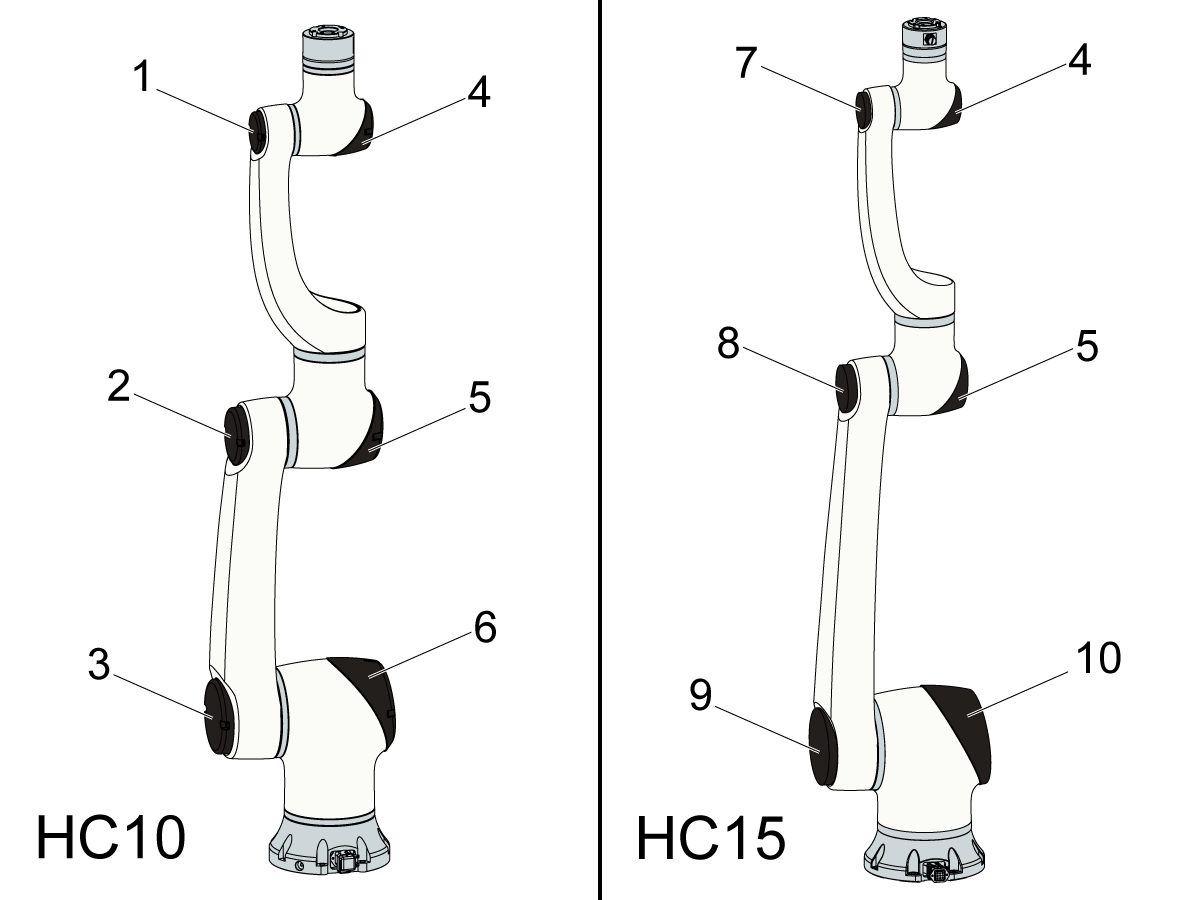
[1]   93-5622 - HAAS COBOT 10KG MD17 SIDE COVER

[2]   93-5624 - HAAS COBOT 10KG MD25 SIDE COVER

[3]   93-5626 - HAAS COBOT 10KG MD32 SIDE COVER

[4]   93-5628 - HAAS COBOT 10/15 KG MD17 JOINT COVER

[5]   93-5629 - HAAS COBOT 10/15 KG MD25 JOINT COVER

[6]   93-5630 - HAAS COBOT 10 KG MD32 JOINT COVER

[7]   93-5623 - HAAS COBOT 15KG MD17 SIDE COVER

[8]   93-5625 - HAAS COBOT 15KG MD25 SIDE COVER

[9]   93-5627 - HAAS COBOT 15KG MD40 SIDE COVER

[10]  93-5631 - HAAS COBOT 15 KG MD40 JOINT COVER

12.3 Haas Cobot - Software Update

Recently Updated

Haas Cobot - Software Update


Revision A - 05/2025

Update Cobot Software

1

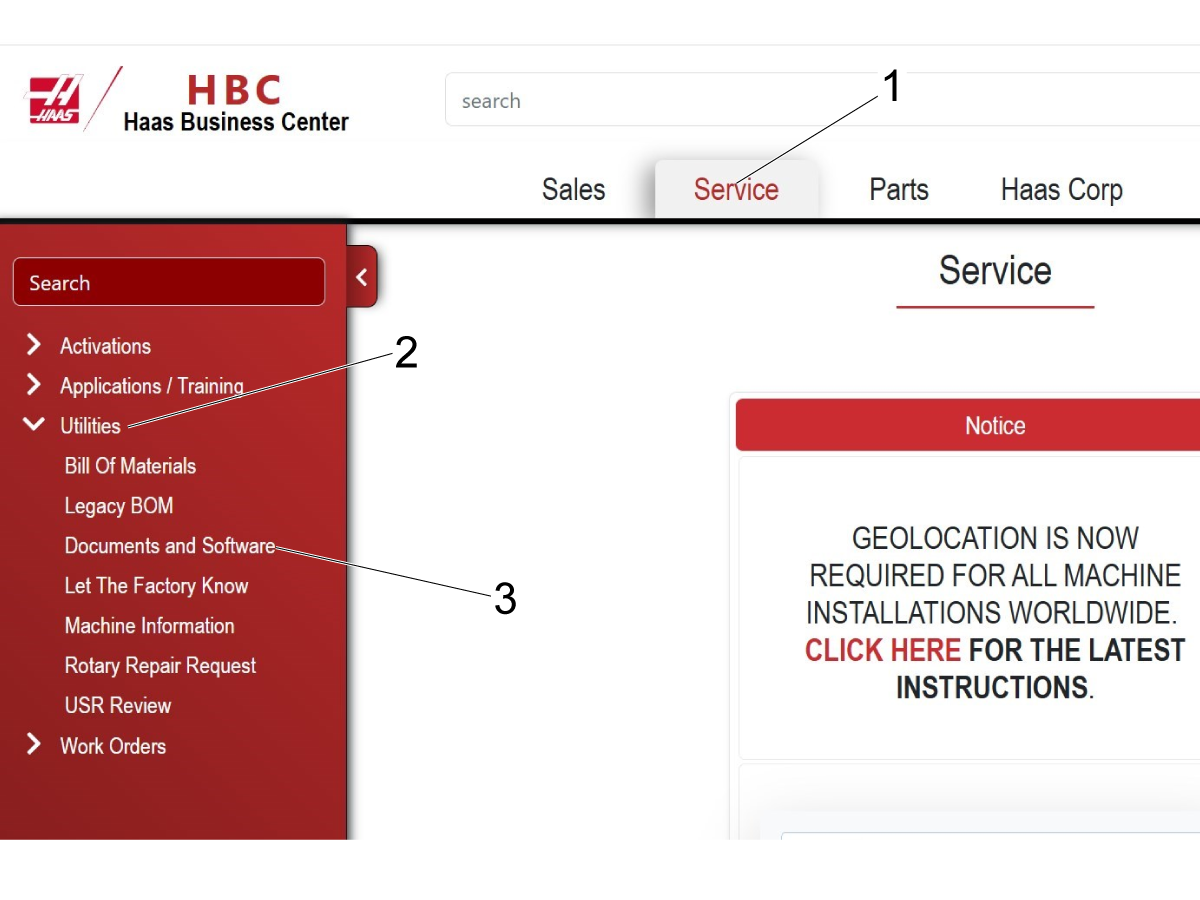
Log on to the hbc.haascnc.com

Note: Only Haas Certified Service technicians can log into this site.

 Note: Make sure you have pop up blocker deactivated.

Select the Service tab [1].

Select the Utilities menu [2].

Select Documents and Software [3].

2

Navigate to the Cobot Software folder.

To get there, select Control_Software > Next Generation Control > Cobot Software.

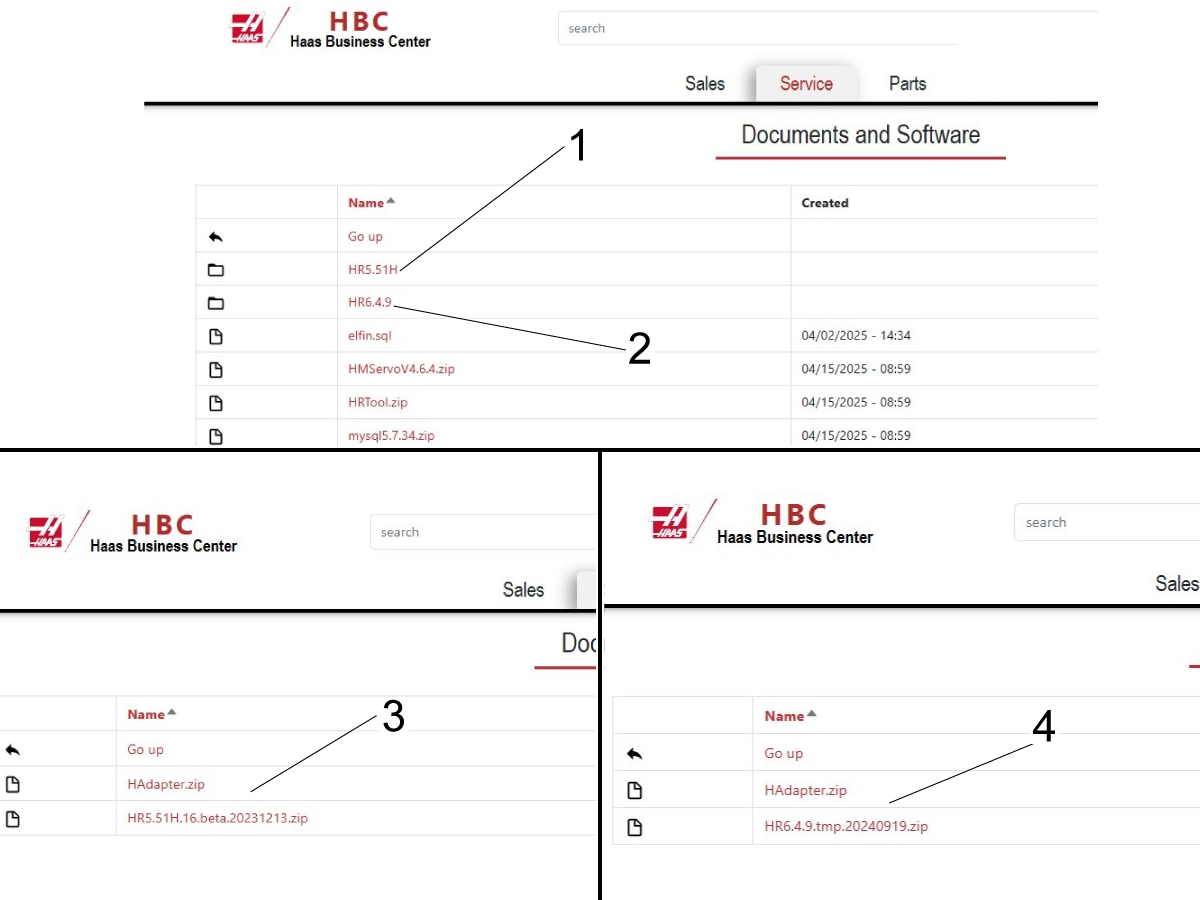
Select the firmware you want to load on the cobot. There are 2 firmware versions available on HBC. 

Enter either the HR5.51H [1] or HR6.4.9 [2] folders depending on what firmware you want to load to the cobot. 

Download both the HRxxxx.zip and the HAdapter.zip  that are in the folder.

Note: The HAdapter.zip files are named the same but they are not interchangeable. For example HR5.51H.zip and the HAdapter.zip [3] need to be downloaded and for HR6.4.9.zip and HAdapter.zip [4] would need to be downloaded.

Note: Refer to the software compatibility table to make sure the cobot is compatible with the software you are trying to update to.

Cobot Type HR5.51H.16.beta.20231213 HR6.4H.9.tmp.20240919
Cobot 5KG
Cobot 10KG
Cobot 15KG
Cobot 30KG

3

The general steps for updating/reinstalling the cobot firmware are given below:

  • Delete the HAdapter.zip plugin currently installed on the cobot.
  • Reboot the control box.
  • Select firmware file to load from USB.
  • Load firmware and wait for control box to reboot
  • Load the correct plugin file.
  • Shut the control box down and wait for 3 minutes. Then power the control box back on.

Delete Plugin

1

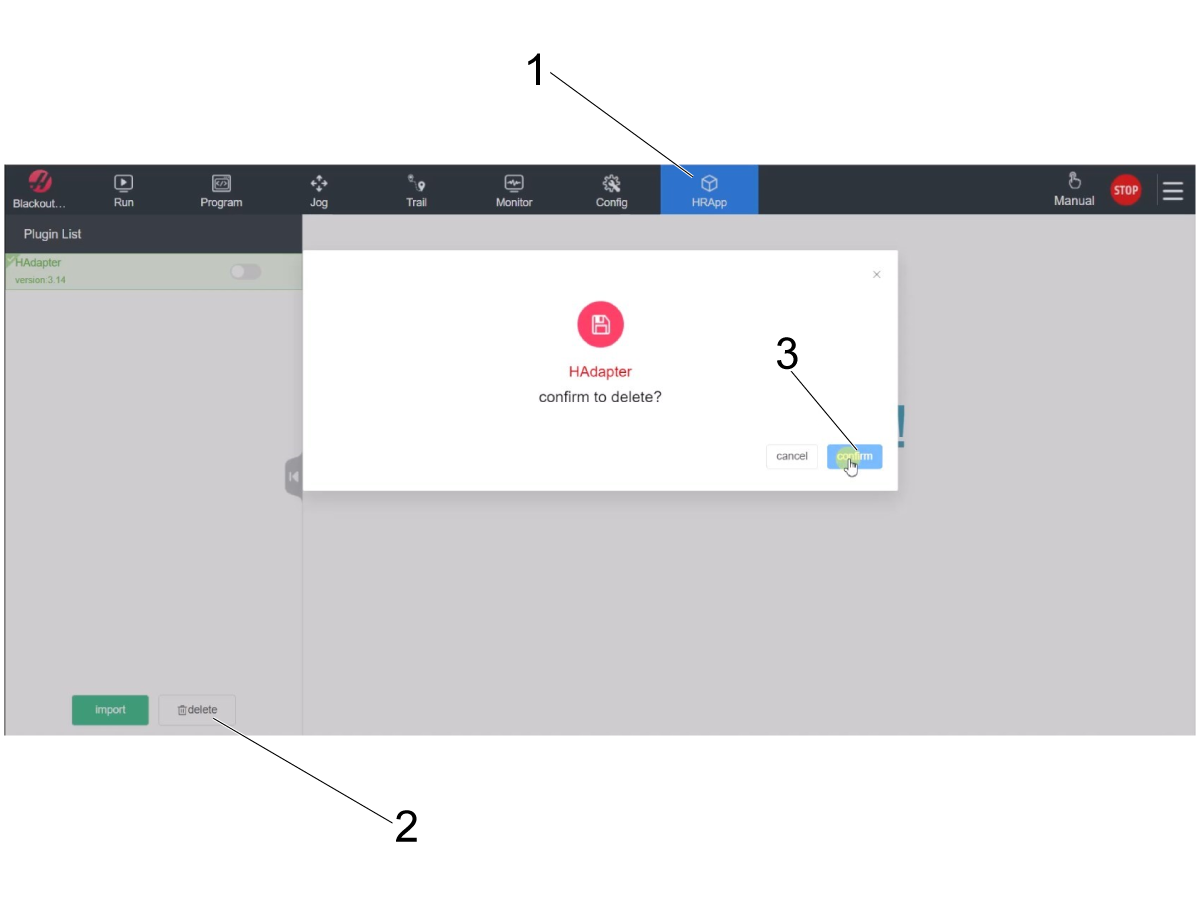
Navigate to the HRApp tab [1] on the toolbar at the top of the pendant.

Press the delete button [2] on the bottom left corner.

Press confirm [3] on the popup to delete the plugin.

2

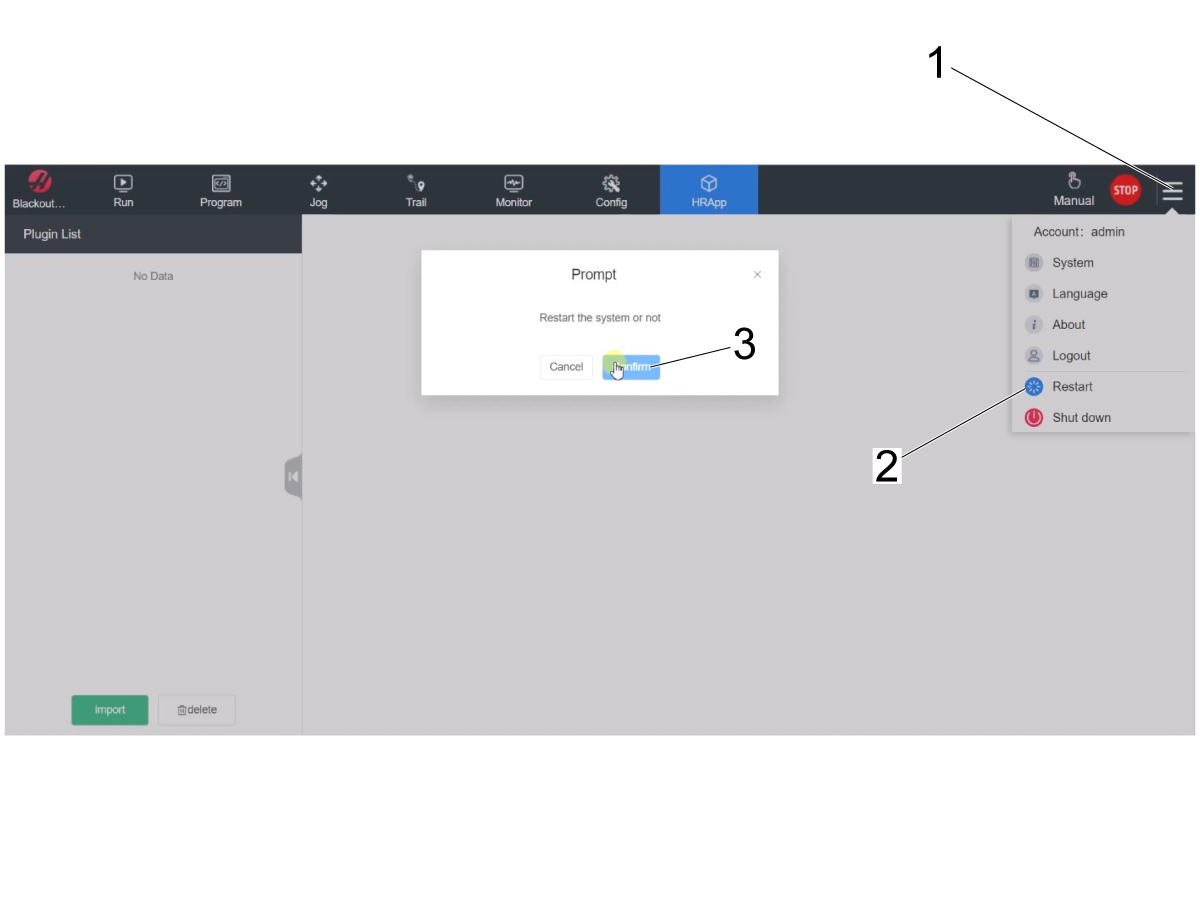
Reboot the control box after the plugin is deleted.

Press the dropdown menu [1] in the top right corner and then press the "Restart" option [2].

Press confirm [3] to restart the control box.

Load Firmware

1

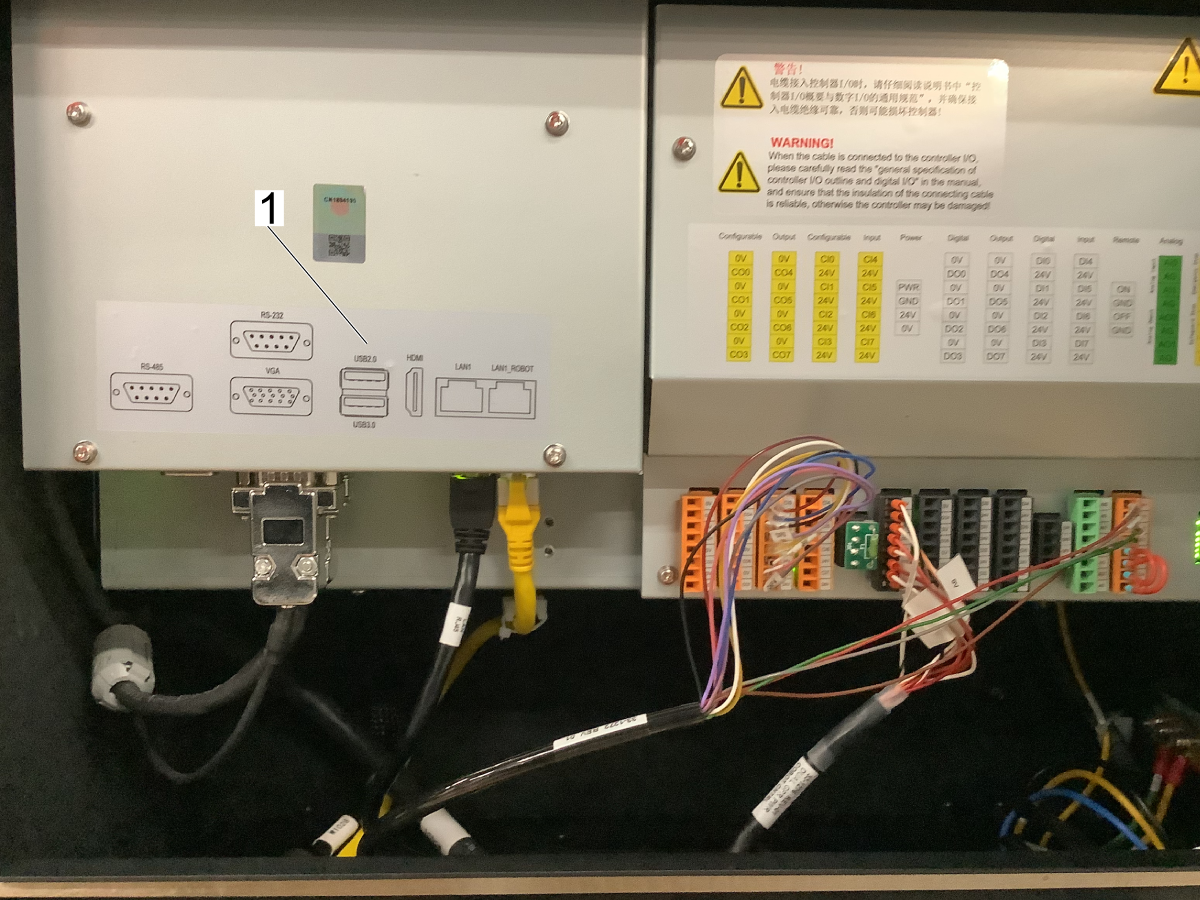
Open up the control box and connect the USB that contains both the firmware zip file and the HAdapter.zip file from HBC.

There are two USB ports inside the control box [1]. The USB can be connected to either of them.

2

Once the control box is rebooted, sign back into the teach pendent using "admin" for the username and password.

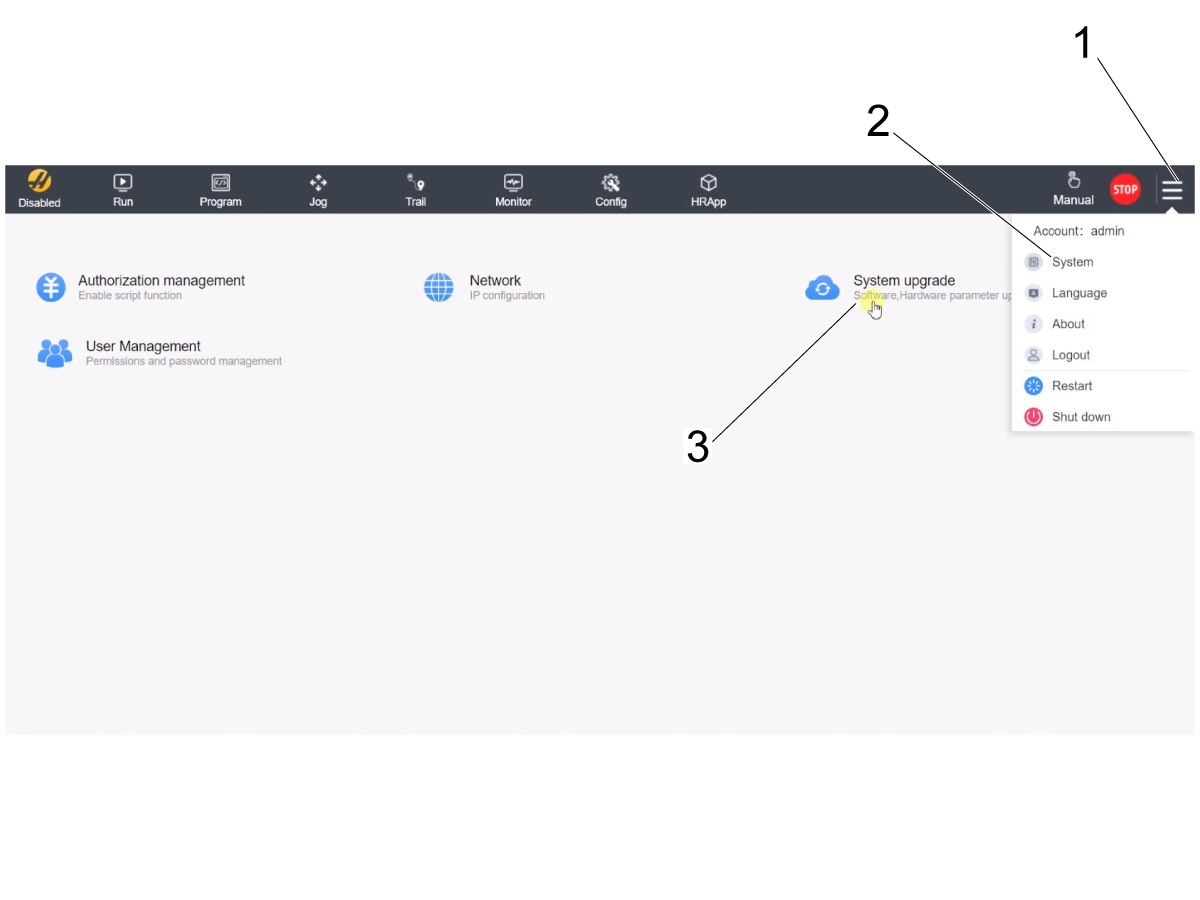
Navigate to the System Upgrade page by pressing the dropdown menu in the top right corner [1] and then pressing the System option [2].

Press the System Upgrade option [3] to bring up the page.

3

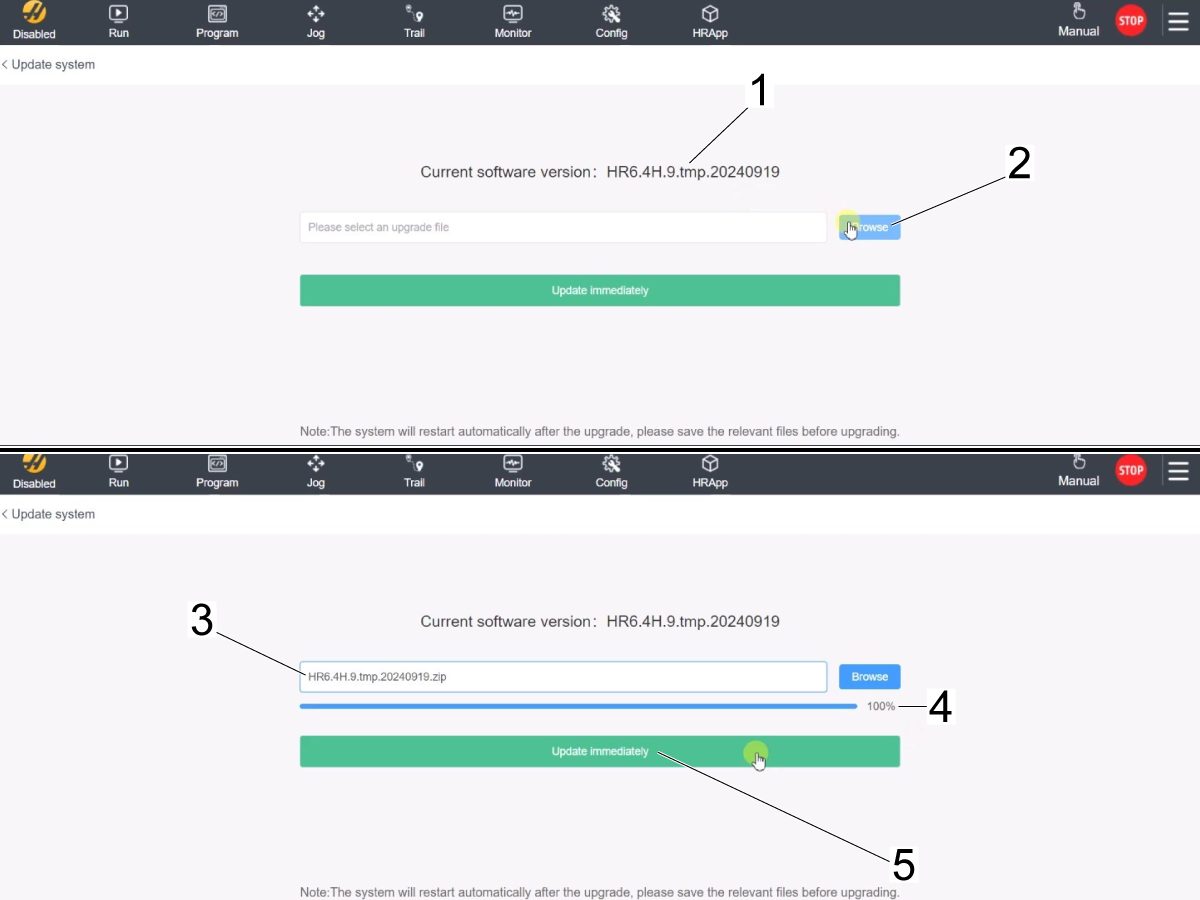
The page displays the firmware version currently installed on the control box [1]. 

To load the version that you want, press the bowse button [2] to bring up the file explorer page. Select the HR.zip file from the USB.

Note: You will see the file you selected in the field next to the browse button [3]. For example in the image HR.6.4H.tmp.20240919.zip was selected from the USB.

Wait 5 - 10 seconds for the firmware version to fully load. On some versions there is a status bar [4]. Wait for it to reach 100% if it is there.

Press Update immediately [5] to update to the selected version.

4

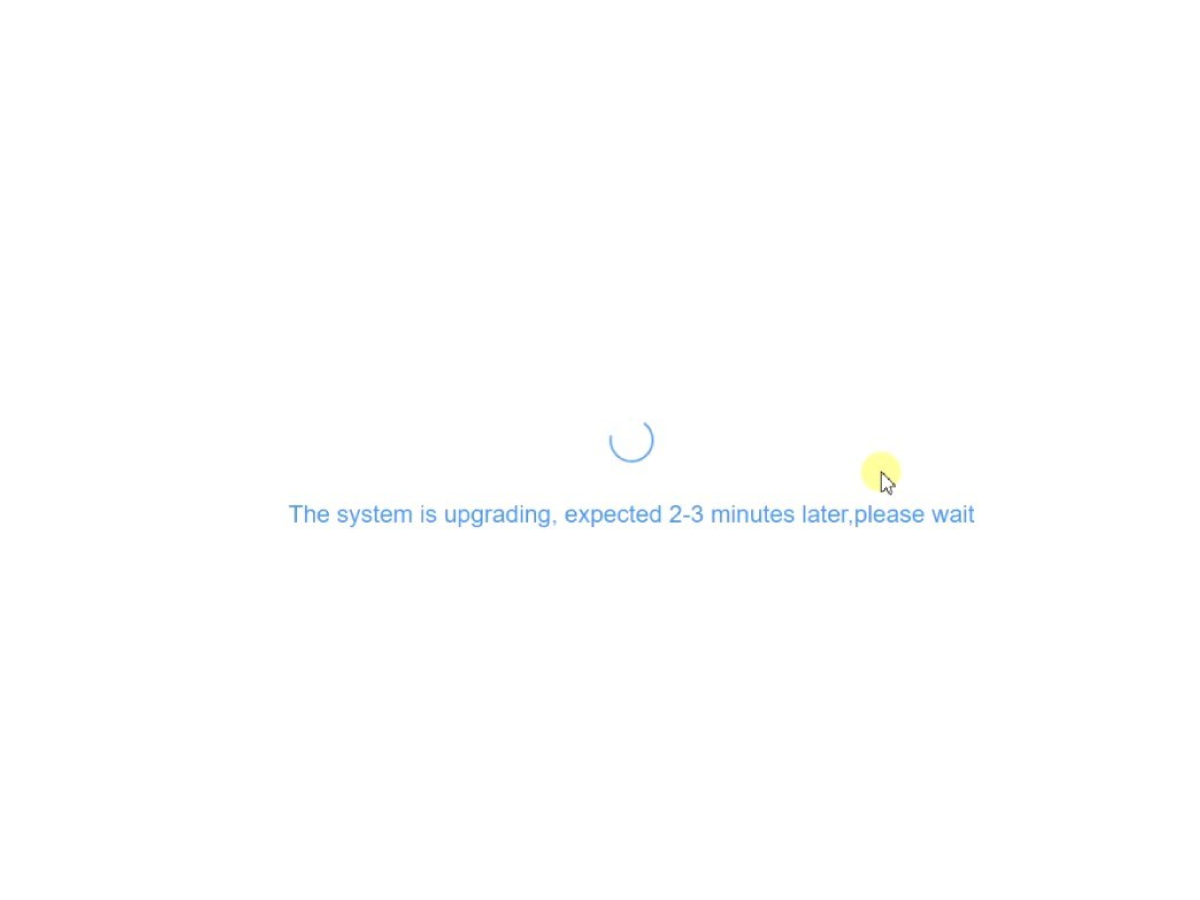
Wait for the system to upgrade. 

The control box will reboot on its own after the upgrade is complete.

After the system reboots, the plugin file HAdapter.zip still needs to be loaded. Continue to the next section for installing the plugin file.

Install Plugin

1

Sign back into the teach pendant using "admin" for the username and password.

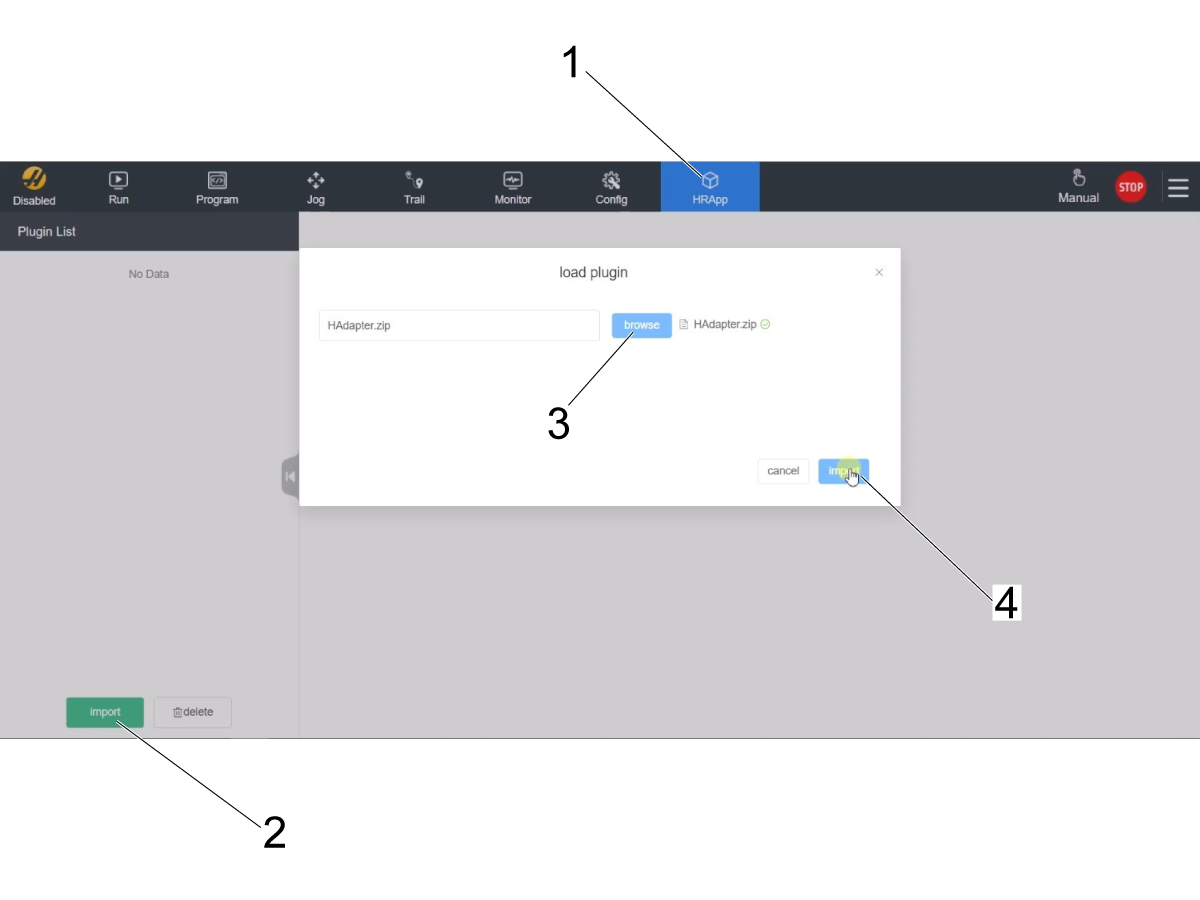
Navigate to the HRApp page by pressing the HRApp icon on the toolbar at the top of the screen [1].

Note: There should be no file listed in the Plugin List at this time. The plugin file should have been deleted before the firmware version was loaded to the control box.

Press the import button [2] in the bottom left corner of the screen.

Press the browse button [3] and select the HAdapter.zip file from the USB. 

The file will show in the field when it is selected.

Press the import button on the popup menu [4] to load the plugin. 

2

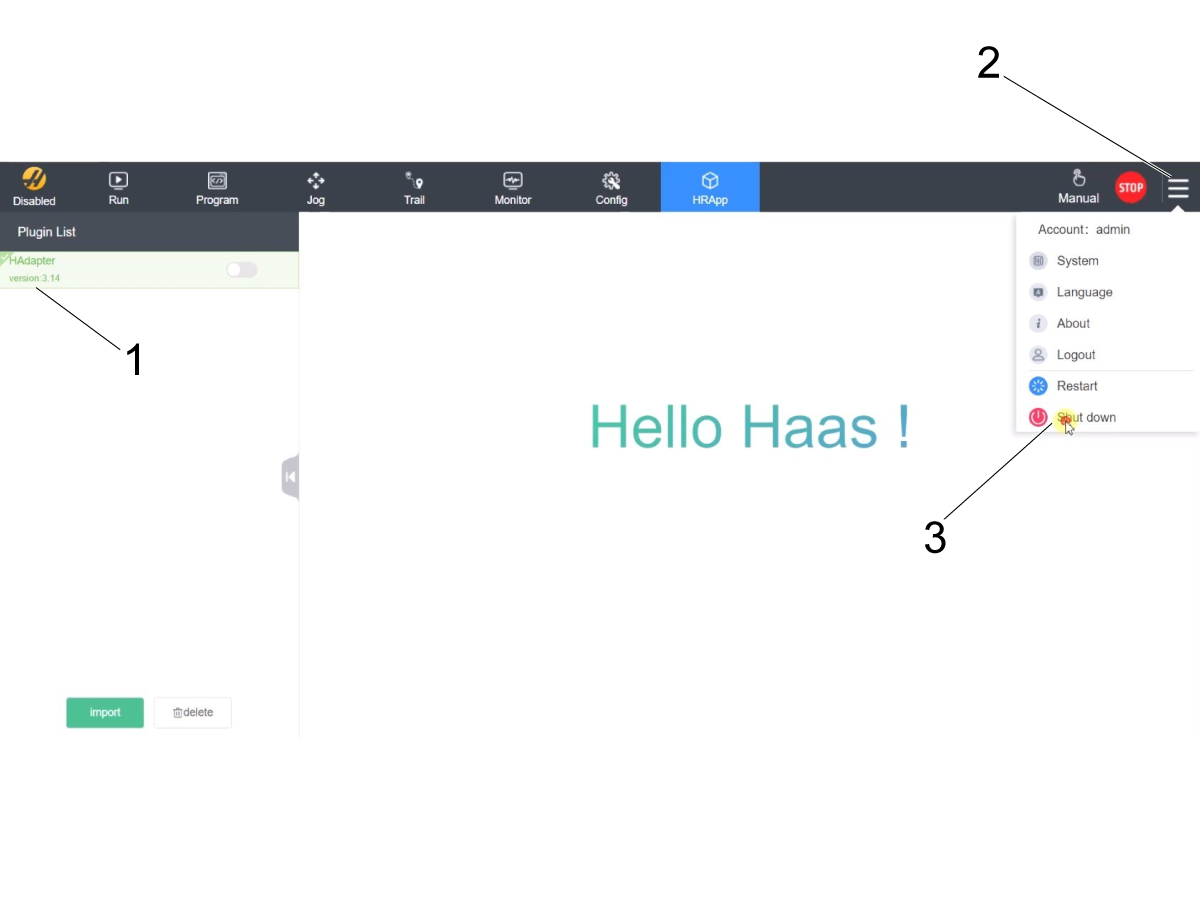
Confirm that the plugin file was loaded successfully to the control box. Verify that the HAdapter version is correct according to the firmware version listed below:

  • HR5.51H.16.beta.20231213.zip needs plugin Version 1.14
  • HR6.4.9.tmp.20240919.zip needs plugin Version 3.14

If the correct plugin version is shown [1] shut down the control box and let it sit for 2 - 3 minutes before turning it back on.

To shut it down, press the dropdown menu [2] in the top right corner and then press the "Shut down" option [3].

Wait for the control to fully shut off, and then wait 2 - 3 minutes before powering back on.

Verify that the cobot can be connected and jogged from the Haas machine to confirm there are no issues when using the cobot.

12.4 Reset Cobot Zero Position

Recently Updated

Haas Cobot - Reset Zero Position


Revision A - 02/2026

Reset Cobot Zero Position

1

The Cobot teach pendant will have a popup asking to insert the username & password. Enter "admin" for both.

Go into Run mode. Press Enable. 

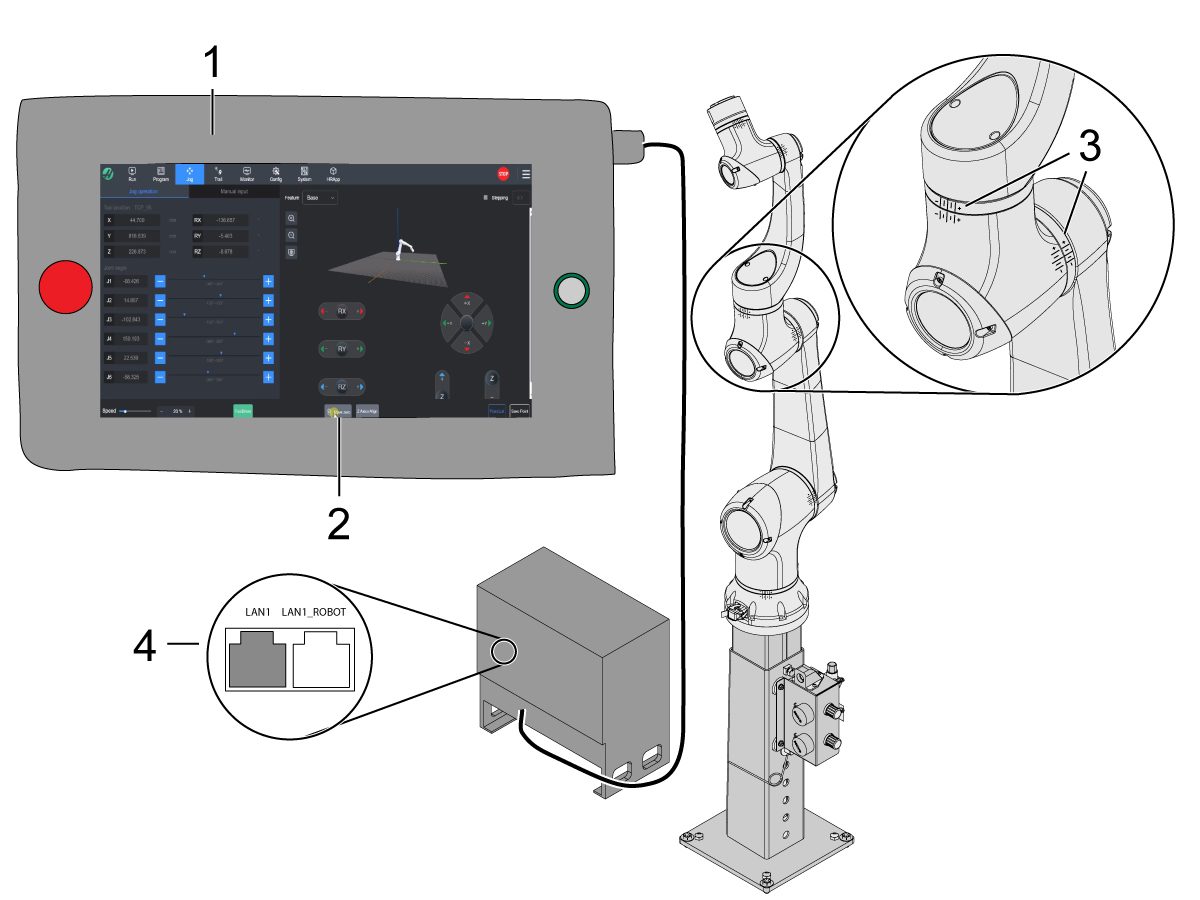
Go into Jog mode [1].

Move each joint to it's zero location with the Move Zero buttons [2]. 

Once the robot is in it's zero location, verify that the hash lines [3] align on either side of each joint on the Cobot. 

Connect an ethernet cable [4] from the Cobot control box into a computer.

On the computer, change the adapter setting to enable the ethernet port. 


2

Download HRTool. 

Unzip the folder and navigate to HRToolsMaind.exe. 

Insert the Cobot IP address found under the Systems tab.  Click Set. 

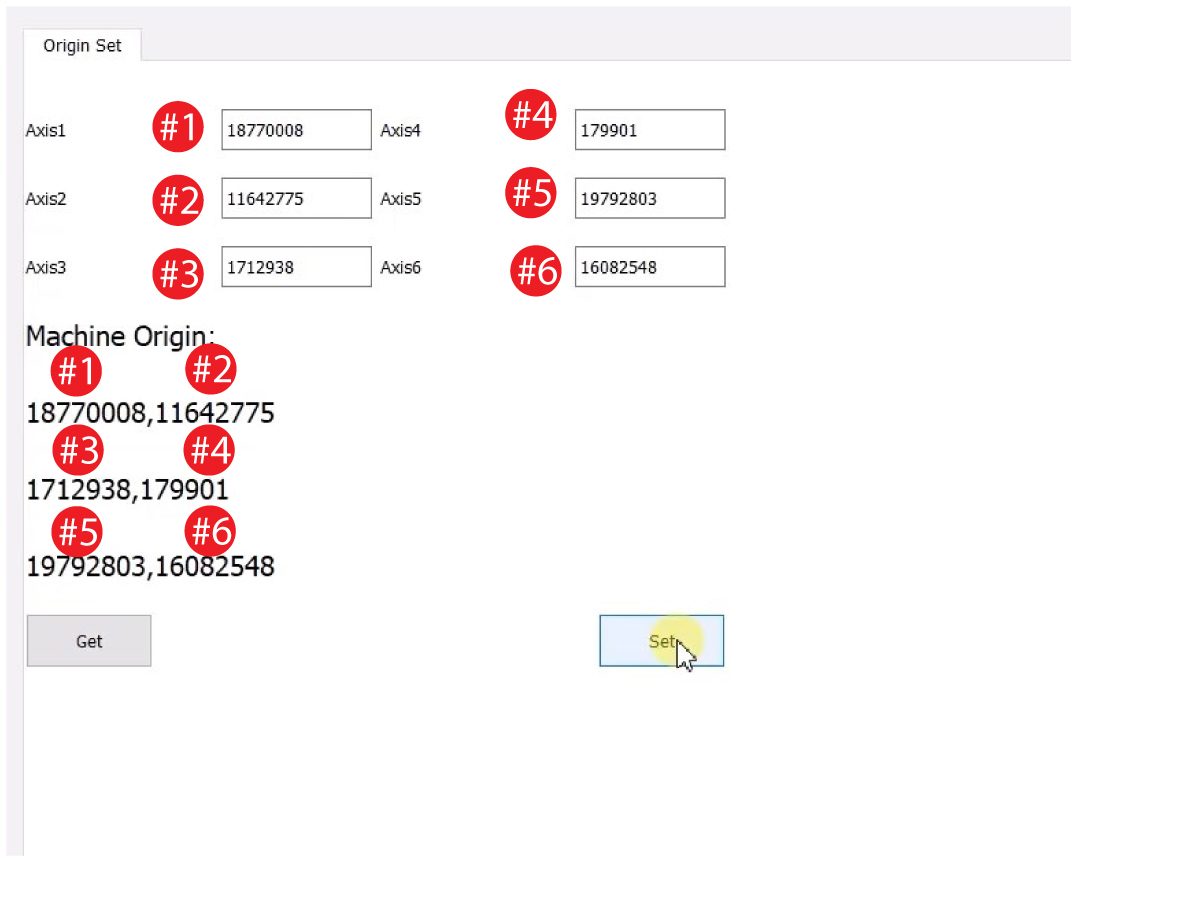
Go to the Config tab on HRTool.

Click "get" to see the actual vs. theoretical encoder values.

Click "set" to set the theoretical to actual encoder values. 

3

Updated

Make sure that each joint's actual and theoretical encoder values match. 

Important: If the simulated cobot on the teach pendent JOG page does not show that it is at the zero position, enter the disable state (48V blackout) and then enable the cobot.

Note: You should see the graphical interface on the JOG tab update to show the cobot arm vertical after re-enabling the cobot on the RUN tab of the teach pendant.

Recently Viewed Items

You Have No Recently Viewed Items Yet

Feedback
Haas Logo

Haas Delivered Price

This price includes shipping cost, export and import duties, insurance, and any other expenses incurred during shipping to a location in France agreed with you as a buyer. No other mandatory costs can be added to the delivery of a Haas CNC Product.

KEEP UP WITH THE LATEST HAAS TIPS AND TECHNOLOGY...

Sign up now!   

HAAS TOOLING ACCEPTS THE FOLLOWING:

  • Service & Support
  • Owners
  • Request Service
  • Operator Manuals
  • Haas Parts
  • Rotary Repair Request
  • Pre-Install Guides
  • Shopping Tools
  • Build & Price a New Haas
  • Available Inventory
  • The Haas Price List
  • CNCA Financing
  • About Haas
  • DNSH Statement
  • Export Compliance
  • Careers
  • Certifications & Safety
  • Contact Us
  • History
  • Terms & Conditions
  • Haas Tooling Terms & Conditions
  • Privacy
  • Warranty
  • Haas Community
  • Haas Certification Program
  • Haas Motorsports
  • Gene Haas Foundation
  • Haas Technical Education Community
  • Events
  • Join the Conversation
  • Facebook
  • X
  • Flickr
  • YouTube
  • LinkedIn
  • Instagram
  • TikTok
© 2026 Haas Automation, Inc – CNC Machine Tools

This site is protected by reCAPTCHA and the Google Privacy Policy and Terms of Service apply.

2800 Sturgis Rd., Oxnard, CA 93030
Toll Free: (888) 817-4446 / Fax: 805-278-8554